Friday, April 27, 2012
Angry Birds Space HD comes to BlackBerry PlayBook

Angry Birds Space HD comes to BlackBerry PlayBook

Almost a month after its release, Rovio's Angry Birds Space HD has arrived on BlackBerry PlayBook platform. The Angry Birds Space HD comes with 60 interstellar levels on planets and in zero gravity. The game has the traditional free updates, new birds and superpowers. PlayBook users can download the game via BlackBerry App World for $ 2.99


“I got a great surprise e-mail from our game guru (and Director, Strategic Business Development for Gaming) Anders Jeppsson. Overnight, our friends at Rovio Entertainment Ltd. submitted Angry Birds Space HD for the BlackBerry PlayBook tablet to BlackBerry App World, and it’s now available for purchase,” says Donny H, Blog Manager for Inside BlackBerry.
Rovio recently announced 10 new free levels of Angry Birds Space, the latest iteration of its one of the best selling gaming franchises on the mobile platform. The free levels are currently available for Android and iOS users. The new levels are called “Fry Me to the Moon”. Angry Birds Space is available as a free download for Android Users but iOS users will have to shell out $0.99 (Rs. 52 approx.) for the iPhone/iPod touch version and $2.99 (Rs. 157 approx.) for the iPad version.
The new Angry Birds Space game, which notched up 10 million downloads in three days of launch, has various new features such as gravitational fields and new angry birds – such as the Space Eagle. The game has 60 initial levels and six new characters and has what Rovio describes a "unique twist in a variable gravity environment".
Rovio will be rolling out its Angry Birds Space for Windows Phone platform as wel
Sunday, April 22, 2012
Best Apps For Smart Phone And Tablet

Best Apps For Smart Phone And Tablet


Best Apps For Smart Phone And Tablet

Evernote :

This app consider as sharper and active app. that called much useful as it works. you can insert your notes all time. It is like extensions for some most browsers. You can snip on web too. obtainable on Android, iOS, Blackberry, Mac OS X, Windows.

Dropbox:

Have much comparable status to Evernote, this is also a cloud service. You can stock your files up to 2 GB on their servers for free. Do insert more storage up to 16 GB.you can use referring  system, through their referral program.
Available for Windows, Mac OS X, Linux, iOS, Android, Blackberry.

Google Voice:

It is phone app service. This is best by google.make direct calls to any your friend or relative any time. Even readable your voice messages too.
If you are in the States then you are free to call anyone within the country for free. It is a great service available on several platforms and even allows PC-to-PC and PC-to-phone calls internationally.
Available for Android, iOS, Windows, Mac OS X, Blackberry.

Pageonce:


It will run and track your credit card transactions, bills, itineraries, bank accounts, frequent-flyer miles etc. It is a premium app and costs $7. Available for Android, BlackBerry, iOS, Windows Phone 7.

Angry Birds:


it is very popular and famous game. Even we no need to take any intro for this app. you can download it very easily in any version. You can view its paid and free version too.
Available for Android, iOS, Blackberry, Symbian, Windows Phone 7, Windows.

Shazam:

Shazam, will show you the song, artist’s info and even the lyrics of the song. You can read album reviews, artist info etc. in the app too.
Available on Android, BlackBerry, iOS, Symbian, Windows Phone 7

Kindle:
Just get this free app to read books anywhere you go, and also buy books from Amazon too. Available on Android, BlackBerry, iOS, Windows Phone 7, Windows,Mac OS X.

Foursquare:


Connect with friends wherever you go with this great service which lets you “check in” at places such as restaurants, hotels, stores etc.  With this free app. It fix with facebook too. It is a universal app and is very handy if you want to meet your associates somewhere.
Available on Android, BlackBerry, iOS, Symbian, Windows Phone 7, WebOS, Meego


Spotify:

It river songs to your smarpthone/laptop from their library which boasts of over 80 years of non-stop music and about 10,000 tracks are being added every day. You can generate a playlist that is synced to your device so that you can listen to them offline too.
It is a premium service and you can try it for free for a month at first.
Available on Android, BlackBerry, iOS, Symbian, Windows Phone 7, WebOS, Meego.

Sunday, April 15, 2012
no image

Google Play Now Accepts Paid Android App Submissions From New Seller Countries

google-play


While Google’s top brass were busy dissecting the company’s Q1 earnings on their scheduled conference call, it was business as usual for the rest of the company. Over on the official Android Developers blog, for example, Google announced that developers in the Czech Republic, Mexico, Israel, and Poland can now sell Android apps and in-app additions in the Google Play store (and in their native currencies to boot).
“But wait,” you may say. “Developers from Israel and Mexico have been able to sell their apps for years now!” You’d be absolutely right — the Czech Republic and Poland are the only really new additions, but there was a bit of a catch for the other two.
At the time, developers in Mexico and Israel could only sell their apps through an AdSense merchant account and set prices in U.S. dollars. With this new change in place, Google now supports both countries’ respective currencies. The process for Israeli or Mexican developers to make the transition seems a bit hairy though — Google outlines the whole thing here, and it involves creating a new Google account and re-registering with Google Play.
So what does this mean for you developers? Well, unless you live in one of the aforementioned countries, not a whole lot. While most of the work will have to be done by developers operating out of those locales, Google still suggests that you consider whether or not you want to set a specific price for each of those new markets instead of just letting your default price ride.
Those minor issues aside, Google now officially supports paid application sales from developers in 31 countries. It sounds pretty good until you realize that it’s taken over a year and a half for Google to add these new names to the list of supported countries. I’m sure that developers in those countries will appreciate that Google has finally gotten around to them, but there are still quite a few that haven’t.
A link to the post was shared by the Android Developers’ Google+ account, inspiring a litany of requests from people asking Google to support their countries as well, prompting Android Developer Relations Lead Reto Meier to apologize for the delay. Then again, Google’s always been very upfront about this sort of thing — they note in their list of seller countries that they are “unable to provide any guidance on timelines.”
Sunday, April 8, 2012
4 Latest Mobile Technologies and Their Advantages

4 Latest Mobile Technologies and Their Advantages

In today’s modernized world, telecommunications are one of the most fascinating technologies used by most people. Mobile phones have indeed come a long way from simply a mode of communication to one of the best gadgets that acts more like your mates. It has become so popular that one cannot imagine their lives without a mobile phone. It is not just a necessity, but an addiction too especially for teenagers. It is impossible to live without mobile phones today as the demand for mobile phones have gone up like wild fire. You will find almost every person walking on the street using mobile phones. Some of the groundbreaking mobile technologies have been listed below.
Near Field Communication
near_field_communication_nfc
(Image Source: Thebusinesstalks.wordpress.com)
One of the latest advancements in mobile technologies is with regards to how one pays for certain products in the checkout. Mobile phones like Samsung Galaxy Nexus make use of NFC (Near Field Communication) chip that makes contact with a reader in order to process a particular transaction. Some of the renowned outlets like McDonalds and Walgreens have already started using Near Field Communication equipped terminals. In addition, you can also make use of Google wallet service for tracking purchases too. Although some of the phones do not support Google wallet, therefore utilizing NFC for paying by phone is being worked out.
The greatest advantage of NFC is that it saves time as all you need to do is simply tap your cell phone on the terminal. NFC goes well beyond monetary transactions. You can now exchange data between two cell phones of Galaxy Nexus with the help of Android Beam service. You can place the mobile phones back to back for swapping browser pages, contact, and YouTube videos. Also, you can see Bluetooth gadgets using NFC for authenticating the connection between a headset and your phone, by tapping the devices at the same time. So, there is no need for Bluetooth pins anymore.
Bluetooth Health Device Protocol
bluetooth_health_device_protocol
(Image Source: Dexigner.com)
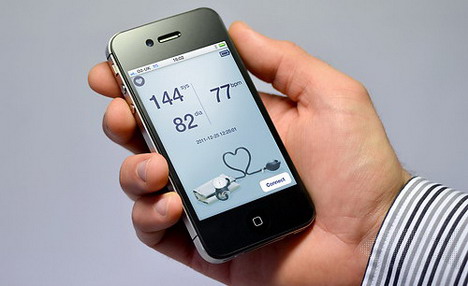
Bluetooth has always been around as it works quite well to stream music from the car stereo to your phone, or to use like a headset. But, now there have been quite a few advancements that are beyond the basic usage. The latest innovation is the new protocol known as Bluetooth Health Device Protocol that has already gained popularity. The whole idea of inventing this technology is to connect to heart trackers, step counting sensors in shoes, and the workout bike at the gym with no need for attaching transmitter. The best advantage of using Bluetooth Health Device Protocol is that it works well and needs no external adapters.
Advanced Mobile Security
advanced_mobile_phone_security
(Image Source: News.com.au)
As far as the security of mobile phone is concerned, Mobile Spy is the cell phone monitoring software that helps in protecting all the confidential information saved in the smart phones. When a phone gets stolen or misplaced, the data stored can be deleted discreetly to ensure that the same is not being misused. In addition, last year, a researcher discovered carriers making use of a service called as Carrier IQ. This particular service monitors the text messages as well as emails. Although, this exclusive service is something mobile carriers generally install it on their own, there are high chances that hackers could also do the same, or install an application that records sound and videos even when you are not making use of the inbuilt camera. In order to keep the mobile security intact, carriers like Verizon and Sprint have started making use of a threat management service known as Lookout. It analyses flags and traffic harmful malware and blocks access to your cell phones operating system.
Expansion in Speech Recognition
expansion_in_speech_recognition
(Image Source: Appadvice.com)
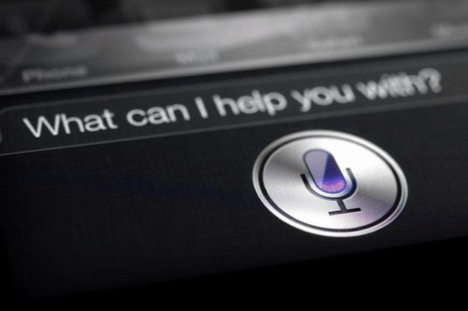
The Siri service especially on the iPhone 4S has proved that voice recognition feature on a mobile phone device actually works. You can speak commands like setting up a reminder on a dinner date with your loved ones, which appears as a pop up when you leave your workplace, based on the GPS location. The service can also read the incoming text messages. All the new applications will advance further. The Vlingo application for Android has the capability of reading all the incoming messages in addition to emails. This is quite an impressive advancement as email includes larger vocabulary when compared to text messages.
Advantages of Mobile Technologies
Increases Profitability & Productivity
Mobile technology helps people use the data and resources of the company without being tied in one particular location. Whether you are travelling for official meetings, on sales calls, working from home due to health problems, mobile technologies helps you to stay connected, be more productive, and make best use of company’s resources for the betterment of the business in terms of business profits. Employees cannot give excuses anymore that they are out of office in order to escape from their responsibilities.
Communication & Networking
Mobile technology gives room to companies to have connectivity between vendors, employees, or customers. Employees can download certain useful applications on their cell phones that help them to be aware of all the whereabouts of the company, and they can also get connected to social network such as Facebook, Twitter and related social media sites. Real time communication with the employees can be beneficial to deliver business requirements such as giving presentations to clients, quotations, checking stock levels, interacting with other employees while travelling, etc.
Marketing
There has been a new dimension introduced by mobile technologies into marketing and advertising for businesses across the globe. Potential clients can now see business advertisements and promotions on mobile phones with the help of varied marketing inventions such as text messages, mobile applications, mobile sites, banner ads, and more. These advertisements help in customizing in order to reach more targeted, and specific audiences. Marketing becomes more effective through this customization as there is an increased exposure of advertisements through the mobile technologies.
Business Development
As the technology of telecommunications is interactive in nature, exchanging information through this particular medium helps businesses to get instant feedback on services and products from clients. Due to this accessibility and speed, there is a rapid growth in the business development.
Wednesday, April 4, 2012
iPhone is more Popular than Android for WiFi

iPhone is more Popular than Android for WiFi

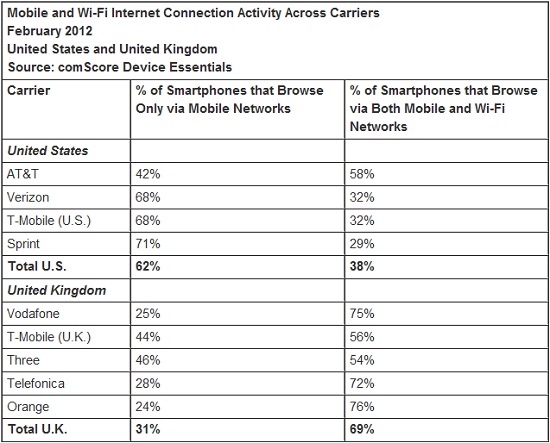
It is said in a survey that iPhone users use more WiFi network than Android users as Androidusers prefer their own mobile network whenever they feel to need to browse the internet.


The study however is not a general way to represent a global specimen, but based on user of smartphones in America only. In terms of percentage, 9% of iPhone users use mobilenetworks, while 68% of the ANdroid users are on ot. Comparatively, 71% of the iPhone users use WiFi and only 32% of the Android users are into it. This only shows where the trend for the advertisers must head to.
However in UK, WiFi is big with Android users, but at the same time, it is huge with iPhone users too, who also use mobile network equally. It then goes down to habit of browsing the internet basically or it could be about the strength of the WiFi connection and mobile networksservices in these two regions while creates the difference.
Here below is the result of iPhoen and Android users WiFi usage survey in US and UK:
Tuesday, April 3, 2012
Shazam 5.0 launches, can identify songs in one second

Shazam 5.0 launches, can identify songs in one second

Shazam is out with what is self-described as a “major update” to the app, version 5.0. It delivers a groundbreaking new feature thanks to rewritten software that enables users to tag audio and Shazam will identify it within a single second.
Now, you can launch the Shazam app, put your phone up to a speaker that’s playing back a song, television show, or television advertisement, and in one second figure out what the hell you’re listening to as well as save or share it on your social networks. The app also brings up its trademarked LyricPlay service which scrolls through lyrics to songs while keeping pace with the song playing and information such as links to purchase, music videos, tour dates and the like. Shazam is able to do all of this far faster than any of its competitors, e.g. SoundHound or IntoNow.
Some of the minor, but still notable updates that made it into version 5.0 include a somewhat revamped user interface, the ability to add a comment to tags shared to Facebook or Twitter, and support for new languages: Brazilian Portuguese, Korean and Spanish for South America.
It’s interesting to see how Shazam has evolved over time. I remember when it was a simple app for tagging music. Then fierce competition arose and Shazam sprung to its full potential, bringing features for tagging television programs and much more. Shazam 5.0 with one-second tagging is another step ahead.
The update is only for iPhone and iPod touch in the App Store. It applies to the free Shazam app as well as Shazam Encore and (RED), both $6.
Monday, March 26, 2012
Now No Need To Worry If Someone is Talking To You While You Are Wearing Headphones

Now No Need To Worry If Someone is Talking To You While You Are Wearing Headphones

Most of the users use head/ear phones to listen to music from their smartphones and one of the disadvantages of that is after putting them on you lose all track of the things happening in your surroundings. Of course some people do that to avoid crowded and noisy environment but when you are sitting at home where there is complete silence.
We are going to introduce a new app to you it’s called Around Sound. This app has the functionality to solve this issue and lets you keep track of your surroundings while listening to music. It is an Android app, it basically pauses the music when it detects a sufficiently loud noise.
Well, we have tested this app on our Android smartphone running Ice Cream Sandwich, and we assure you that it works as advertised.
It is very simple to set up this app. When you launch the Around Sound, options screen appears that offers to different options including Pause Mode, that pauses your music whenever a loud enough sound is detected on the other hand, we have Resume button, that resumes the music when the sound is stopped. You can easily set the trigger level of sound by sliding your finger over it and tap start to enable the service.
Working
Once you have configured and started the Around Sound, it will start listening sounds with the help of your earphone’s mic or your Android device’s mic. If it detects some loud sound, it will automatically pause the music playback and it will be playback that loud sound to you. Around Sound not only works with your Android stock music player but it also supports PowerAmp, Uber Music, WinAmp, DoubleTwist. It even supports MX Video player which means that it will also pause the video if a loud outside sound is detected.
A Very Useful App
Overall, it is a very interesting concept and in my opinion it can proved to be very useful when you are listening to music in your home and you want to keep track of your surroundings. It is available in both free and pro versions at the Google Play Store. The paid version comes with an extra “Street Mode”.
Tuesday, March 20, 2012
no image

Check Your Battery Performance With “Badass Battery Monitor”

apps
In the recent times there are not many new smartphones that offer a good battery life. Usually when a smartphone is cut off from the charger in the morning, it is usually unable to make it through the night to be useable the next work day. So, we are in need of a new revolution in battery technology, but at this time we have to try hard to conserve as much battery life as possible and we have to do that without losing features that make our smartphone smart.
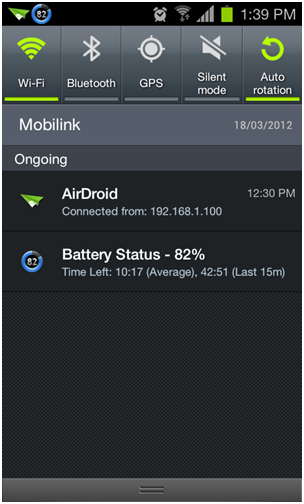
So, we present to you a new app called Badass Battery Monitor. It is a new app and we have found it very useful as it displays all those apps that are responsible for unnecessarily draining of battery life, so you can prevent them from doing so. Take a look here.
android apps
Features
Badass Battery Monitor so many handy features including detailed display of the apps that are using your battery, it also appears in the status bar notification to display the battery state and time left estimates. There are many other features like widgets, the ability to share battery stats and others but the most attractive feature of this app is its ability to tell which apps keep your device in a wakelock.
Which Apps Keep Running in Background?
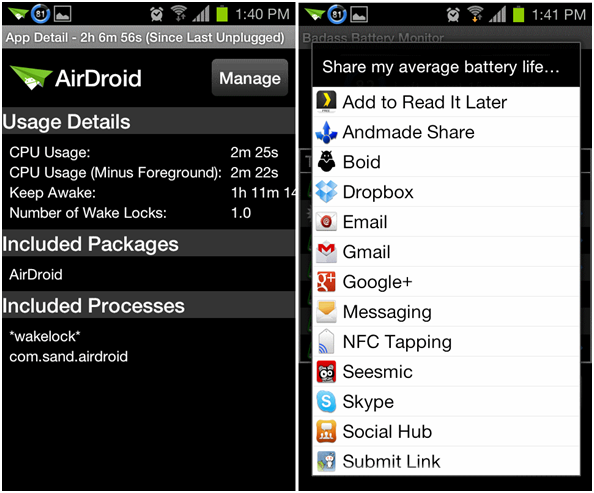
If you are not familiar with the term, Wakelock is a state when your phone’s display is off but still there are apps running in background and using resources. Well, these apps running in background are mainly responsible of the battery drain and it is very important that you should know which apps are those. Here take a look at the screenshot below, it shows how this wakelock feature works. You will have to tap App Usage and then select any app you want to see, if it says wakelock then you have definitely caught that app:
android apps
After testing this app we have found out that Facebook for Android app is responsible for about 10% to 15% of battery life used by apps, so, now whenever I am done using that app, it is exited manually.
There are two versions of the app available right now; one is a free while the other one is Pro version which is optimized for tablets and other large screen devices.
Saturday, March 10, 2012
no image

EZ Drop: Wireless Transfer of Data from PC to Phone Via Web

Transferring files from your Android smartphone to your computer can be a daunting task, most especially if you have misplaced your phone’s USB cable or Bluetooth pairing is giving you a headache.
A simple alternative for those sticky situations can be done by wirelessly beaming files from your PC to your phone via the EZ Drop service. An application known as EZ Drop provides one surefire method of sharing your important files without the hassle of bringing your phone’s USB cable along with you.
EZ Drop works in tandem with the EZ Drop website and mobile client. Users can instantly transfer personal files easily from their computer to their Android smartphones over the EZ Drop website.
Just download the application and you’re good to go. There’s no need to set up complex servers.  No need for creating/registering or logging into accounts.  There’s no need for configuration of IP addresses.  What’s more is that users have the freedom of passing any file type that can be shared without any restrictions. Users just need to download the app and install it on their phone and input a 4-digit PIN provided on the EZ Drop website to get them started.
WIMM One Smart Watch

WIMM One Smart Watch


WIMM One smart watch highlighting the basics and setup. Today I bring you part 1 highlighting the WIMM companion app, which allows you to sync your WIMM One to your phone via Bluetooth. I found setup to be a breeze and straight forward. Once you’re synced (or paired), you will have the ability to checkoff, on your phone, if you would like new SMS text message alerts and/or incoming phone calls to display on your WIMM One.

Now you have the convenience of being able to decide if you want to take a phone call or if you need to quickly respond to a text message without taking your phone out of your pocket. In fact, it really works great for me since I own a Galaxy Nexus. I always leave my phone on vibrate, and the Galaxy Nexus has a very weak vibrator. I can’t tell you how many calls I’ve missed while it was in my pocket. The WIMM One companion app eliminates that. For now only SMS text messages and phone calls appear on the WIMM One, but I’m sure that in the future the ability to get emails, Tweets, and other notifications will be added.
It can be a little annoying going through texts two times for each one, but again you don’t have to always forward them to your WIMM One, it’s your choice. With the app on your phone, you can quickly uncheck SMS forwarding or phone calls for that matter.
The Companion app also allows you to browse the Micro App Store and select what apps you would like to install as well as browse the forums for additional support.
Check out my video and look for part 3 soon, which will highlight many of the apps that are already available in the Micro App Store.
no image

Oxford Advanced Learner's Dictionary 8th Edition for Android

OxfordOxford
Oxford University Press -- the folks behind that big book full of words and defintions -- have just put out an android version of the Oxford Advanced Learner's Dictionary, 8th edition. It's geared toward those who are learing Englishi -- and let's face it, a goodly number of 'mericans might be able to take advantage of it, too.
It's got full-sentence pronunciations, more than 1,300 illustrations to explain words -- and more than 184,000 individual words, phrases and meanings.
The full presser and download links are after the break.
Oxford/Freiburg – March 9, 2012 – Paragon Software Group, a leading multi-platform software developer for mobile devices and desktop computers, and Oxford University Press, the publisher of the world’s most trusted dictionaries and learning materials, have united to bring the Oxford Advanced Learner’s Dictionary, 8th edition, the world’s best-selling print dictionary for English learners and their teachers, to Android mobile devices and tablets.  Loaded with powerful learning features, the app offers full-sentence pronunciations, and over 1,300 colourful group and individual illustrations to explain words and expand vocabulary. The customizable My View allows users to decide exactly which information they want to see, and to find it fast and easily.
With lifetime sales of over 36 million copies, the Oxford Advanced Learner’s Dictionary is the most comprehensive dictionary available to those studying English as a second language, and the app continues this tradition with the learner-focused features for which Oxford is known.
The most up-to-date vocabulary includes the latest definitions, new technological words and modern colloquialisms:
blogosphere n.
cloud computing n.
incentivize vb.
malware n.
staycation n.
tweet vb., n. (new "Twitter" sense)
umami n.

The Oxford 3000™: The 3,000 most important words for an English learner to know have been carefully selected by a group of language experts and marked with a key to show that they are the words that should receive priority in vocabulary study.
Key features:
  • 184,500 words, phrases and meanings explained clearly.
  • 116,000 spoken example sentences – in both British English and American English accents and recorded by native speakers.
  • 1,300 individual and group images.
  • Integrated thesaurus provides thousands of synonyms and lists of collocations (words that go together) to build vocabulary.
  • Use My View to choose how much information appears on your screen – hide IPA, example sentences, pictures, synonyms, etc. – tap to show the full entry again. Define your customized view in Settings.
  • Change the app appearance: customizable background colour, font size, search results highlighting etc.
  • Multitasking features for uninterrupted dictionary use: run the dictionary in the background so you can translate from web pages, emails and applications, or compose email messages in English.
  • ‘Did you mean…?’ function and wildcard search allow you to find a word even if you don’t know the spelling.
  • Full dictionary search allows users to find the word in idioms and phrasal verbs.
  • Find additional information about many words – including verb forms, culture, example bank, synonyms, collocations, etc. – using the menu.
  • No on-going Internet connection required (for headword audio only): simply download the dictionary once and use it on your device without any additional wi-fi expense or availability issues. (Full sound databases can be downloaded from the Settings screen, which require an Internet connection).
  • Tap on any unknown word in an entry to look it up immediately.
  • Search history can be viewed or deleted.
  • Create your own list of favourite words.
  • Detailed help file (available directly from the app)
Requirements: Android OS 1.6 and higher
Copyright © 2012 Mirchu.Com All Right Reserved
Designed by CBTblogger