Saturday, July 21, 2012
How Can You Get Windows 8?

How Can You Get Windows 8?

Will you upgrade to Windows 8? Will you get it on a new PC? On a tablet? Or do you plan to skip it as you may have skipped Vista? For those willing to dip their toes into the waters of Microsoft's drastic re-thinking of its flagship chunk of software, there are a number of options for how to actually get it. And in a poll on PCMag run back when Windows 8 Release Preview was launched, a surprising number of you want to start in with the new OS the moment it's available. For those eager beavers, along with anyone else wanting to move forward in the Windows world, we submit the following guide.
As of a couple days ago, we know exactly when you'll be able to get Windows 8—October 26. Windows head honcho Stephen Sinofsky made the announcement at Microsoft's annual sales announcement on July 18. This availability applies to both new PCs and tablets and to upgrade options.
Let's take a look at the different paths you can take to get to Windows 8 once that date rolls around, with the two primary options being upgrade versus new machine.
Windows 8Upgrade
It looks like upgrade pricing will be a lot more aggressive than it has been for previous Windows generations. Not only has Apple set the tone with its cheap $29.99 upgrades for Mac OS X, but the pricing information that Microsoft has put out so far decidedly slants towards the inexpensive. In any case, both Apple and Microsoft are far more interested in having you buy a new computer rather than just updating your existing model. One columnist has even called the pricing known so far "fire sale prices."

So what will you pay for your Windows 8 upgrade? It depends on when you bought your current PC, whether you want the standard or Pro edition, and whether you opt for download or store purchase of upgrade discs. Though there had been speculation that Microsoft would move to the Apple system of download-only software installation, Windows 8 will be available at retail stores, as proven by a $69.99 DVD offer announced by Microsoft. The small table below summarizes the introductory upgrade pricing options we know about so far. Microsoft has said the prices are good till January 31, 2013.

Upgrade ConditionsCost of Upgrade to Windows 8 Pro
You bought a Windows 7 PC after June 2, 2012$14.99 download
You have any PC running Windows XP, Vista, or Windows 7$39.99 download or $69.99 packaged disc
One question that remains is whether Microsoft will offer a full, non-upgrade version at retail. Another is pricing difference between non-Pro and Pro Editions. We'd assume that with fewer features, the non-Pro Windows 8 upgrade will cost even less, and we can expect announcements on this as we move to the RTM (release to manufacturing—first week of August) and GA (general availability—October 26) stages of development.
One final bit about availability (unfortunately without pricing details, yet) is that there will be System Builder editions of Windows 8 and Windows 8 Pro. This is for folks who aren't upgrading from an existing Windows installation, but rather taking it upon themselves to build their own PCs from component parts. This is a particularly popular endeavor among PC gamers.
Wednesday, April 18, 2012
Microsoft Announces Revamped Windows 8 Editions

Microsoft Announces Revamped Windows 8 Editions

Microsoft has released the list of editions that Windows 8 will be sold in. As of now, there will be four editions, Windows 8, Windows 8 Pro, Windows 8 Enterprise and Windows 8 RT.

The first three editions i.e Windows 8, Windows 8 Pro, Windows 8 Enterprise for PC and tablets users running x86/64 processors and will be on sale whereas Windows RT ill be exclusively for PCs and tablets rumming on the ARM platform and will not be sold but would rather ship built into the devices. According to Microsoft, all editions of Windows 9 offer a no-compromise experience, which has sort of become their slogan with Windows 8.

Windows 8 will be the base version meant for home users and is the equivalent of the Home Premium version of curren Windows 7. All basic features will be included in it.

Windows 8 Pro will have all the features of WIndows 8 but will add additional stuff such as encryption, virtualization, PC management and domain connectivity. You will be able to upgrade to this OS from Windows 7 Professional and Ultimate.

WIndows 8 Enterprise will include all features from Pro and also have “features for IT organization that enable PC management and deployment, advanced security, virtualization, new mobility scenarios, and much more.”

Windows RT (Real Time), or WOA as it was knows before, bill be exclusively for devices running on the ARM platform. It will be optimized for touch and will come with touch optimized version of Microsoft Office built-in, unlike the other three editions. However it will not allow the user to install any other application or the desktop side of the OS and the focus will be on using the Metro apps from the Windows Marketplace.
Saturday, March 31, 2012
Facebook Messenger Released For Windows – Download Right Now!

Facebook Messenger Released For Windows – Download Right Now!


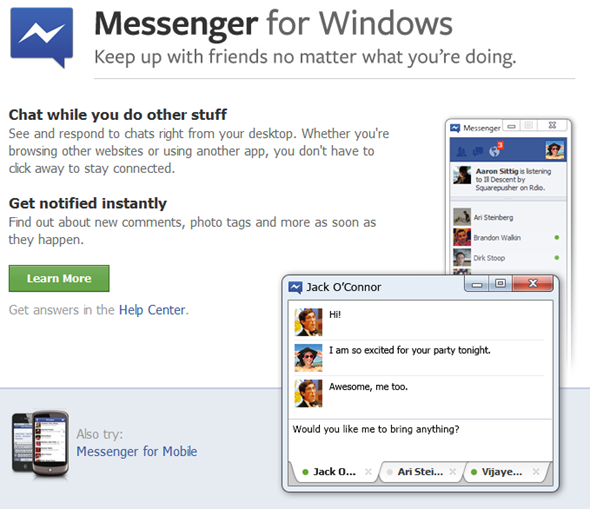
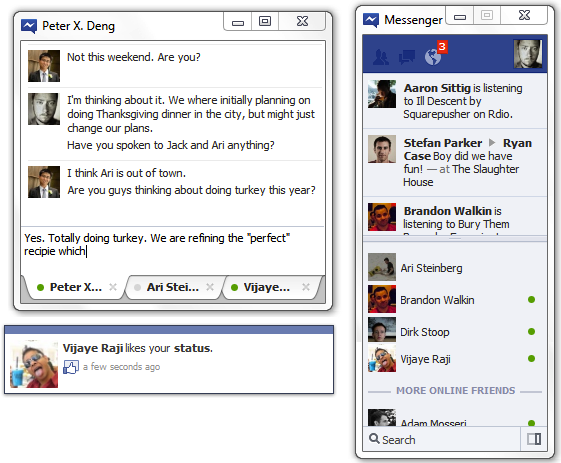
Every One who is a facebook adict saw this coming sonner or latter, Facebook officialy relesed the Facebook Messenger for Windows,Our friends on Mac OS have to wait a bit for this Facebook Messenger.
With the Release of Facebook Messenger , Those who open facebook just to chat with there buddies have only to login to this messenger and they will be good to go. The features are not so much complex though , it is just a chat box with your friends online .Notifications and messeges section.
TechCrunch have noted a couple of ways that they believe the chat client will help Facebook:
    • Persistent access to Chat will increase engagement of the primary user, and also draw their friends to spend more time on Facebook
    • Persistent access to notifications, messages, and friend requests that launch Facebook.com may lead to more return visits than users haphazardly stopping by the website to check for these alerts.

You can download the Facebook Messenger from Clicking here.

You Can follow Us on Facebook and Twitter also you can add us to your Google Circles , We will kep you updated about the latest stuff happning out there.
Wednesday, February 29, 2012
no image

Microsoft Releases Windows 8 Consumer Preview

Tired of just hearing about Windows 8 all the time? Well then, you’re in luck — Microsoft has finally released the Windows 8 Consumer Preview to the public, so people outside of the tech bubble finally have the chance to take Redmond’s new OS for a spin.

Be warned though: the file sizes range from 2.5 to 3.3 GB depending on your preference between the 32-bit or 64-bit versions, so you may be downloading for quite some time.
Hopefully the download process isn’t too much of a headache — according to Microsoft’s Steven Sinofsky, they’re already bracing themselves from the hordes of Windows 8-hungry users. The servers seem to be coping with the load just fine for right now (thanks for the heads up, commenters), but we’ll see how things progress as more people hear about it.
Alongside the long-awaited download links, Microsoft has also provided users with the necessary system requirements for running the Consumer Preview, and they’re just as lax as what Windows 7 required. While a 1GHz processor and DirectX9 or later are a must, the rest of the requirement depends on which version of the OS you would like to run. If you’re a 32-bit type, you’ll only need 1GB of RAM and 16GB of disk space, while those of the 64-bit persuasion need at least 2GB of RAM and 20GB available on their hard drives.
All apps and functions are pinned to these tiles and interaction is as simple as clicking them. A full screen view of your tiles fills the desktop and it can be scrolled horizontally. The whole interface is customizable and you can pin apps, programs, document and webpages among other things.
If you don’t like the Metro interface you can easily switch the old traditional desktop. Once you do switch to it, one can see general improvements overall to common stuff like the task manager.image thumb1 Windows 8 Consumer Preview Released
The lack of buttons and windows is apparent when you look at the interface. There are gestures you can use instead as shortcuts. For those who don’t have touch tablets there are mouse gestures available too.
A surprise in Windows 8 is how good Internet Explorer 10 is. Fluid, fast and responsive, it’s actually a worthy alternative to Chrome and Firefox.
image thumb2 Windows 8 Consumer Preview Released
Here are a few screenshots for your viewing pleasure:

Windows 8 has literally got hundreds of new features so a rundown of what’s new would make this a very lengthy post, so give it a spin. The minimum requirements are:
  • 1 GHz or faster processor
  • 1 GB RAM (32-bit) or 2 GB RAM (64-bit)
  • 16 GB available hard disk space (32-bit) or 20 GB (64-bit)
  • DirectX 9 graphics device with WDDM 1.0 or higher driver
  • 1024 x 768 minimum screen resolution
There may be additional requirements to use certain features like Snap and Touch based gestures though.
The Windows 8 Consumer Preview is available worldwide for download in English, French, German, Japanese and simplified Chinese languages.
If you prefer ISO files, go to the following link to download the image files:
Or you can just go the following link let it decide which version would be suitable for you:
Note: Only upgrading from Windows 7 is treated as a full upgrade. If you upgrade from Windows XP or Windows 8 developer preview, only your user accounts and files will be saved and you’ll lose your settings and programs.

The preview can be downloaded here  — enjoy! (Oh, and let us know what you think.)

Copyright © 2012 Mirchu.Com All Right Reserved
Designed by CBTblogger